Clock Removal And Installation On Land Rover Discovery
Applies To:
Discovery I | '94-'99 Discovery Series II | '99-'04
If your clock unit has failed, it is easily replaced with genuine part, however, removing the old unit requires some specific steps as follows:
Remove drinks tray.
Remove ashtray by pushing spring clip down.
Remove auxiliary switch panel, it snaps out.
Remove six screws holding tray. Three in each compartment where switch panel and ashtray were.
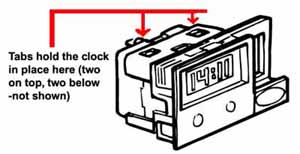
Remove clock by releasing four tabs that hold the clock in place. To release the tabs, insert a thin strip of metal such as a feeler gauge at four places indicated in picture. You will need to do all four at the same time.
Slide clock out and disconnect electrical plugs.
Install new unit by connecting electrical plugs and snap back in place.
My sales rep is very knowledgeable and very pleasant to work with
Roy V. Middletown, NY
3-27-24
Item was delivered as described, shipped out immediately, I had my parts in 2 days.. Very Much Recommended !!
MR S. BURR OAK, MI
3-27-24
Great service, awesome attitudes and great responsiveness. Even a little humor.
Mason M. Farmington, NM
3-27-24
Great service and communication.
Stephen H. Marietta, GA
3-26-24
customer support is always able to sort through my questions fast
Steven M. GRAND RAPIDS, MI
3-20-24
Always have the parts I need, usually in stock, and super fast shipping...all at a decent price. Personable, friendly, attentive and super helpful.
Joseph M. Sackets Harbor, NY
3-14-24
Pricing was excellent and shipping was very fast
David M. Grosse Pointe Park, MI
3-4-24
Every time I have ordered parts they show up on time, in perfect condition, and they fit no problems. You also have a great help line in case you have questions about the work …
Peter P. Marysville, WA
3-3-24
I trust that my order will be reviewed and made certain order corresponds to my particular year and model vehicle. Saves a lot of potential headaches.
Norman W. San Antonio, TX
3-2-24
Website is very clear and intuitive. I can always find what I am looking for in minutes. The checkout procedure is very clear and simple as well.
Jason M. Carolina Beach, NC
2-28-24
Reviews from our Customers...
FAST Shipping! Call these Folks they have all the answers to your part installation.
-Bill M. (Boydton,VA)
Great customer service, very knowledgeable staff. Everyone I have worked with are Land Rover owners- which is a big help for knowing the vehicles.
You always have the parts I need at a great price and everyone Ive ever spoken to has a great knowledge of all Land Rovers
-Keith B. (Blue Ridge,VA)
Professionalism. My sales rep is a rock star, and I value both his technical expertise and his knowledge of your product line.
-Alan R. (N. Chelmsford,MA)
FAST Shipping! Call these Folks they have all the answers to your part installation.
-Bill M. (Boydton,VA)
Great customer service, very knowledgeable staff. Everyone I have worked with are Land Rover owners- which is a big help for knowing the vehicles.
You always have the parts I need at a great price and everyone Ive ever spoken to has a great knowledge of all Land Rovers
-Keith B. (Blue Ridge,VA)
Professionalism. My sales rep is a rock star, and I value both his technical expertise and his knowledge of your product line.
-Alan R. (N. Chelmsford,MA)
You always have the parts I need at a great price and everyone Ive ever spoken to has a great knowledge of all Land Rovers
-Keith B. (Blue Ridge,VA)
Professionalism. My sales rep is a rock star, and I value both his technical expertise and his knowledge of your product line.


 Select Your Vehicle


